![mySidewalk_Logo_2_Color-2.png]](https://help.mysidewalk.com/hs-fs/hubfs/mySidewalk_Logo_2_Color-2.png?height=40&name=mySidewalk_Logo_2_Color-2.png)
Getting Started
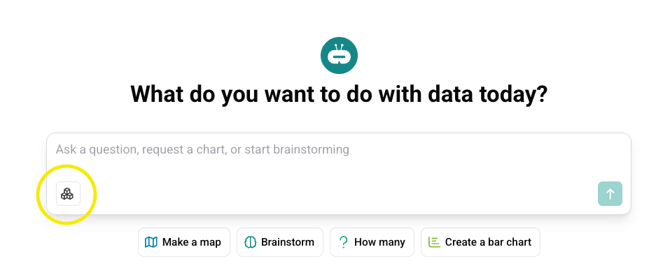
How do I turn on Sidekick Build?
To start using Sidekick Build, click on the icon in the bottom left corner of the prompt box.
What can I create with Sidekick Build?
Build creates complete, structured deliverables—community needs assessments, housing reports, grant narratives, economic analyses, stakeholder presentations, and more. If it's a data-driven document that tells a story about your community, Build can help you create it.
Start with a template for common deliverables, or write a custom prompt if you have something specific in mind.
How long does it take to build a deliverable?
Most deliverables take 5-15 minutes to generate, depending on complexity. A simple assessment might finish in under 5 minutes. A comprehensive report with multiple sections and data visualizations could take closer to 15.
You can watch the build happen in real time—Sidekick shows you each step as it works.
Do I need to use a template?
No. Templates are helpful but optional. Use a template when you want a structured starting point for common deliverables. Templates include pre-built sections, data choices, and narrative guidance for specific use cases.
Use a custom prompt when you need something templates don't cover, or when you want complete control over the structure from the start.
Both approaches work.
How Sidekick Build Works
Is Sidekick mySidewalk's LLM?
No, Sidekick uses large language models (LLMs) from vendors like OpenAI—but the intelligence comes from how we've built around them.
Think of the LLM as a translation layer between you and the mySidewalk platform. The AI interprets your request, but it's working with our proprietary data library, metadata, templates, and tools infrastructure. Sidekick is the experience. The LLM is one component that powers it.
What happens when I submit a prompt?
Here's the flow:
- Your prompt is processed along with instructions we've provided behind the scenes, and any template you selected
- The LLM interprets what you're asking for
- Sidekick decides which tools to call—data searches, geography queries, visualization builders, narrative generators
- Those tools execute against mySidewalk's data library and your uploaded documents
- Results are assembled into your deliverable
You can watch this happen in real time. Sidekick shows you each step as it works.
What are "tool calls"?
When Sidekick is building your deliverable, it acts like a dispatcher—choosing the right internal function for each part of the task.
When you see it "searching median age" or "building visualization," those are tool calls. Discrete actions that fetch data from mySidewalk's library, create charts, structure sections, or generate narrative text.
The LLM decides which tools to use and in what order. The tools do the actual work.
Is Sidekick learning from my prompts?
No. Your prompts and work products are not used to train the underlying language model. mySidewalk stores account information, usage data, and logs system interactions for monitoring and product improvement. But your specific prompts, uploads, and deliverables remain yours—they don't become training data for AI models.
Uploading Files
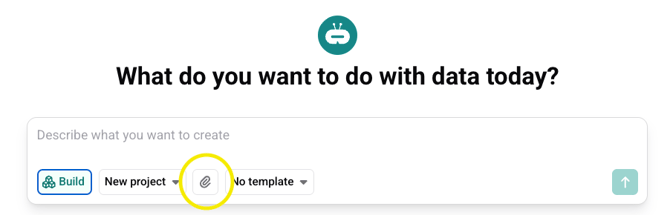
How do I upload files?
To upload files to Sidekick Build, click on the paperclip icon in the prompt bar.
What file types can I upload?
Sidekick Build accepts:
- PDFs (.pdf)
- Word documents (.doc, .docx)
- Excel files (.xls, .xlsx)
- PowerPoints (.ppt, .pptx)
- CSVs (.csv)
- Text files (.txt)
Is there a file size limit?
No, but for larger documents, consider extracting the most relevant sections.
What if my document is mostly images or scanned pages?
Sidekick reads text—not images. If your document is primarily charts, infographics, or scanned pages, Build won't be able to extract and use that content yet.
Quick test: if you can highlight and copy the text, Sidekick can probably read it. If the text is embedded in an image, it can't.
Do I have to upload documents?
No. Uploaded documents make your output more specific and personalized, but they're not required.
Without documents, Build draws from mySidewalk's verified data library and your prompt. The output will be accurate and well-structured—it just won't include all of the specific detail that your documents might contain.
What happens to the files I upload?
Uploaded files become "attachments" that Sidekick can reference throughout the build process. If you attach a strategic plan, Sidekick can pull from it when structuring your narrative. If you attach a community survey, it can weave those findings into the report.
Your files are processed by our LLM vendor (OpenAI) to generate responses, but they are not retained by OpenAI longer than automated abuse/moderation checks require nor are they used to train AI models. Within mySidewalk, your uploads are secured with industry-standard encryption.
Data and Sources
Where does Sidekick get its data?
Sidekick pulls from the mySidewalk data library—the same curated, source-documented data available throughout the platform. See our catalog here.
Sidekick does not pull from the open web. No Reddit threads. No random articles. It's data you can defend.
How do I know what data Sidekick used?
Every data point in your deliverable is sourced. You can see citations in the generated report, and you can click into Sidekick's "thinking traces" during the build process to see exactly which data searches it ran and what came back. Every visualization links to detailed attribution information, including links to the original sources.
Can Sidekick use my uploaded data to create charts?
Sidekick can reference your uploaded data in the narrative and recommend visualizations—but it can't generate charts or graphs directly from your data files (yet). For custom visualizations from your data, you'd add those manually in the report editor.
Is my data safe?
Yes. Here's how we protect it:
- Encryption: Your data is secured with industry-standard encryption in transit and at rest.
- No model training: Your prompts, uploads, and deliverables are not used to train AI models.
- Vendor processing: Our LLM vendor (OpenAI) processes content to generate responses but does not store your files.
For detailed security information, contact us at hello@mysidewalk.com.
How does Sidekick avoid making things up?
There are many ways we address the potential for "hallucinations":
- Restricted data access: Sidekick only pulls from mySidewalk's vetted data library or your uploaded documents—not from general web searches.
- Rich metadata: Every data source in our library includes context about its purpose, appropriate uses, limitations, and geographic availability. Sidekick uses this to make better decisions.
- Template constraints: Templates guide Sidekick's behavior so it stays focused on specific tasks rather than wandering.
- Regular evaluations: We run rigorous evaluations monitoring data accuracy across outputs.
- Auditability: Everything is traceable. You can see exactly which tool calls were made and which data came back.
Human review is still recommended. You know your community better than any AI. But the system is designed to minimize errors and make them easy to catch
During the Build
Can I stop or cancel a build in progress?
Yes. If you need to start over mid-build, you can cancel the process and try again with a different prompt or different inputs.
What if Sidekick asks a question I don't know the answer to?
That's fine. Answer what you can, and Sidekick will work with what you give it. You can always refine the output afterward.
If a question doesn't apply, say so—or provide a general direction and let Sidekick take it from there.
Can I edit the deliverable while it's still building?
Not during the build. Once the build completes, you can refine it through conversation or open it in the report editor to make direct edits.
Refining and Editing
What if the first draft isn't quite right?
That's expected—and designed for.
You have two options:
- Refine through conversation: Ask Sidekick to adjust tone, shorten sections, add content, or change the angle. Good for broad changes.
- Edit in the report editor: Make direct changes to specific words, sentences, or visualizations. Good for precision edits.
Most users do both. The first draft is a foundation, not a final product.
How do I export my finished deliverable?
From the deliverable preview, you can download as a Word document.
From the report editor, you can:
- Publish as a shareable web page
- Download as PDF
Projects and Collaboration
Who can access my Projects?
Projects are shared across your organization's account. Team members with access to your account can view, modify, and build from Projects.
Can multiple people work on the same deliverable at the same time?
Not simultaneously. When you open a deliverable in the report editor, you're working on your own version. Collaboration typically happens sequentially—one person creates the draft, another refines it.
For team workflows, Projects help maintain consistency so different team members can create related deliverables independently.
Troubleshooting
What if Sidekick stops mid-build?
Sometimes Sidekick pauses unexpectedly—either with an error message or just... silence. First, try prompting it to continue. Something like:
- "Keep going"
- "Please continue building"
- "Why did you stop?"
Often, Sidekick will pick back up and finish the deliverable.
If it doesn't respond or the issue persists, start a new conversation and try again. Your uploaded documents and Project context will still be there—you're just resetting the build session.
What if Build produces unexpected or inaccurate results?
A few things to check:
- Prompt clarity: Was your prompt specific enough? Vague prompts lead to generic outputs. Add more context.
- Document relevance: Did you upload documents that might be confusing the output? Try removing documents that aren't directly relevant.
- Geography: Did you specify the right geography? Sidekick defaults to what you tell it—make sure it matches your intent.
If something still seems off, let us know at hello@mysidewalk.com so that we can look into it and resolve any potential bugs or other unexpected issues.
What if Sidekick can't find data for my geography?
The mySidewalk data library covers most U.S. geographies, but not all datasets are available everywhere. If Sidekick can't find data for a specific indicator or location, it will let you know—and may suggest alternatives or acknowledge the gap.
Is there a mobile version of Build?
Sidekick Build is designed for desktop use. While you can access mySidewalk on mobile devices, the Build and report editing experience is optimized for larger screens where you can review documents, watch the build process, and make edits comfortably.